Shops
Fast checkout with a barcode scanner, receipts for every sale, stock levels and simple daily reports.

Point of sale
A web-based point-of-sale system for shops, companies and multi-branch chains in Pakistan. It runs in the browser, so there is nothing to install.
Who it is for
Fast checkout with a barcode scanner, receipts for every sale, stock levels and simple daily reports.
Several users with their own sign-in and permissions, cash shifts, purchases from suppliers, customer credit and an audit log.
Several branches and registers under one business, stock kept per branch, transfers between branches and branch-wise reports.
Features
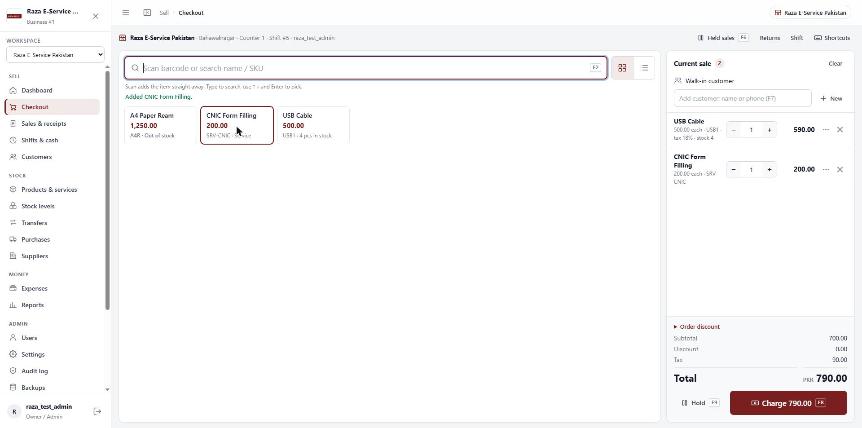
Scan a barcode or search, hold and resume sales, process returns, and print 80 mm receipts or A4 / PDF invoices.
Products and services, stock per branch, low-stock warnings, purchases from suppliers and transfers between branches.
Shifts with opening and closing cash counts, cash in / out records and expense approvals.
Customer records, credit sales and collections.
Sales, gross profit, stock and shift reports.
Roles and permissions for each user, two-step sign-in and an audit log of important actions.
Your own logo, colours and receipt details on screens, receipts and emails.
Screenshots
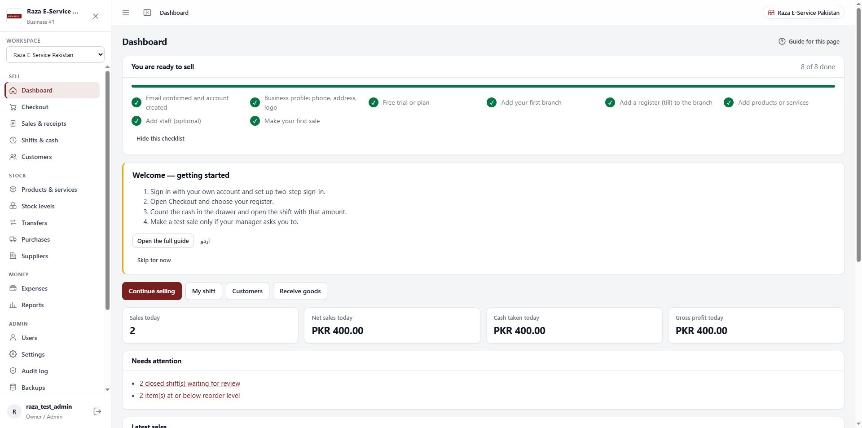
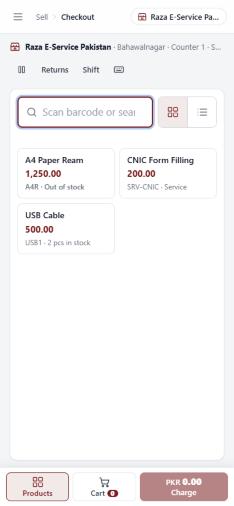
Screens from the live product: dashboard, checkout on a computer and checkout on a phone.
Plans
Prices from the plans currently offered on the Raza POS platform.
PKR 500 / month
or PKR 5,000 per year
14-day free trial
Hardware
FAQ
No. Raza POS works in a web browser on a computer, tablet or phone.
Scanners in keyboard (HID) mode, connected by USB, a wireless receiver or Bluetooth. The POS has a test screen to check your scanner.
Yes, through the browser on 80 mm or 58 mm thermal printers, or as A4 / PDF invoices.
Each business's sales, customers and stock are kept separate. Our support team can open them only if the business owner grants support access.
Subscription invoices are paid by bank transfer. Upload the payment proof in Billing and our team verifies it.
Tell us about your shop or branches and we will show you how Raza POS works for you.